> ## Documentation Index
> Fetch the complete documentation index at: https://docs.usefluency.com/llms.txt
> Use this file to discover all available pages before exploring further.
# Initiatives
> Track committed opportunities from backlog to live automation, with milestones and delivery owned by the Fluency team.
**Initiatives** is where a committed [opportunity](/understanding-opportunities) becomes an automation Fluency's team builds and ships with you. Nothing about the evidence or the case for it changes, you're looking at the same automation, now with a plan attached.
Open [app.usefluency.com](https://app.usefluency.com) → **Initiatives**.
## How an initiative comes to life
You don't need to hand off a spec or start from a blank template. Fluency already knows the process, the systems it touches, and how your organization runs.
Turn an opportunity into an initiative, or create one directly from the board with **New Initiative**.
Book a call with the Fluency team. They build the delivery plan directly on the live map behind the initiative.
Fluency owns the build end-to-end, moving the initiative through Planning → Building → Testing → Deployed.
Everything an initiative shows carries forward from the opportunity that created it. If something's wrong upstream, fixing it in [Work Explorer](/understanding-work-explorer) or the opportunity flows through here automatically.
## The Initiatives board
Initiatives are laid out on a board, one card per initiative, grouped into columns by where they are in delivery.
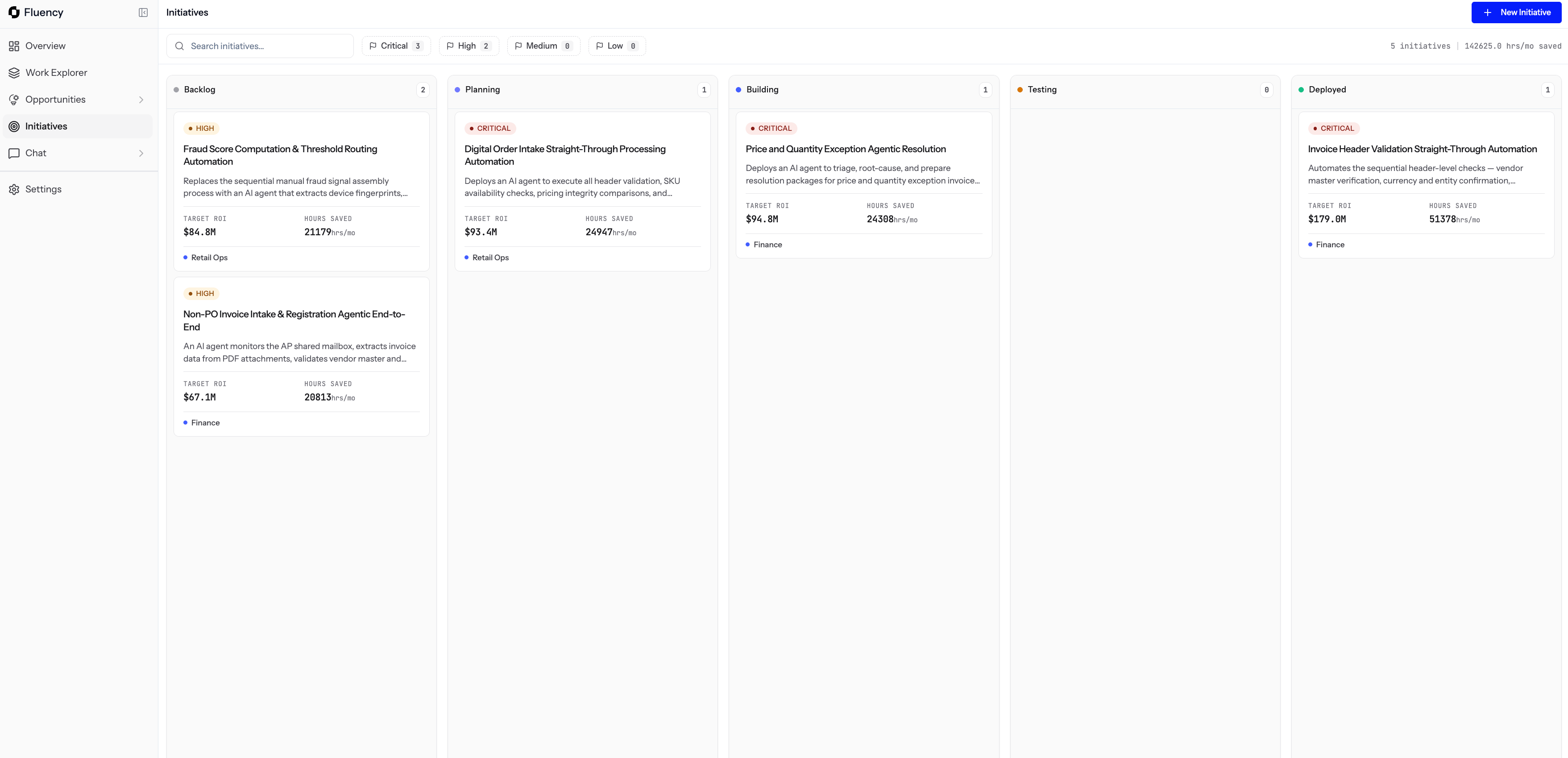 | Column | What it means |
| ------------ | ----------------------------------------- |
| **Backlog** | Committed, not yet started. |
| **Planning** | Being scoped before build starts. |
| **Building** | Actively being built by the Fluency team. |
| **Testing** | Being verified before go-live. |
| **Deployed** | Live and running in production. |
Use the search bar, the priority filter, and the totals at the top to see what's in flight and what it adds up to.
### What each card shows
| Column | What it means |
| ------------ | ----------------------------------------- |
| **Backlog** | Committed, not yet started. |
| **Planning** | Being scoped before build starts. |
| **Building** | Actively being built by the Fluency team. |
| **Testing** | Being verified before go-live. |
| **Deployed** | Live and running in production. |
Use the search bar, the priority filter, and the totals at the top to see what's in flight and what it adds up to.
### What each card shows
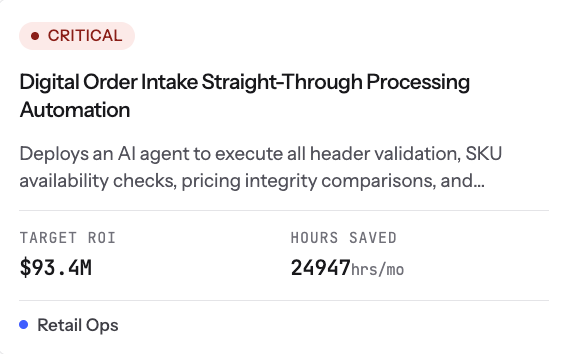 Each card shows:
* **Priority** and **title**.
* A short **description** of what will be automated.
* Projected **ROI** and **hours saved**.
* The **team** the initiative belongs to.
## Opening an initiative
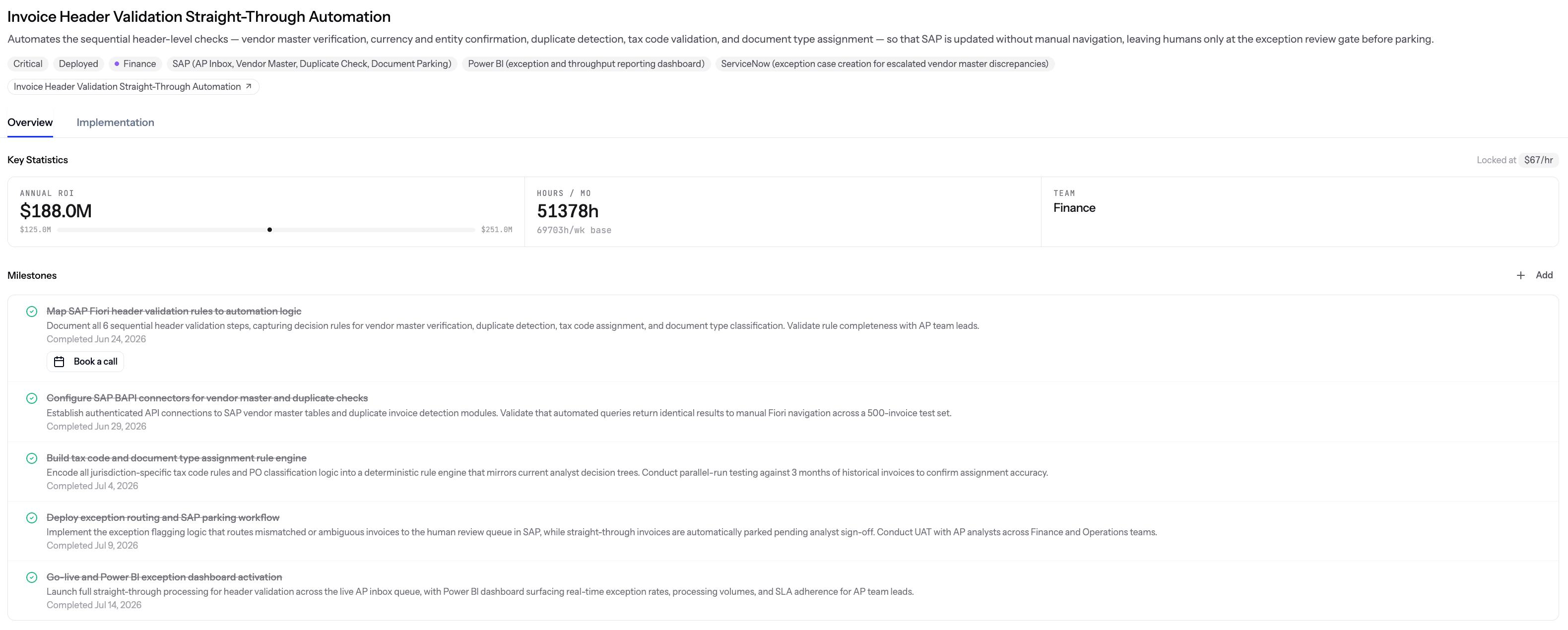
Clicking a card opens the initiative's **Overview** and **Implementation** view: the automation type, priority, team, systems involved (each with a note on the part it plays), and the workflow diagram.
This is the same case you saw on the opportunity, carried forward. Nothing here contradicts what you committed.
## Milestones
Every initiative has a milestone checklist: the concrete, ordered plan for how the automation actually gets built.
* Each milestone has a short description and, once done, the date it was completed.
* The Fluency team owns the build end-to-end and works the milestones with you until go-live.
* You can add your own milestones if there's a step specific to your organization.
The first milestone is a **Book a call** action. Because the live map already knows the work, the systems, and how your organization runs, that call builds directly on top of the observed context instead of a blank template.
Each card shows:
* **Priority** and **title**.
* A short **description** of what will be automated.
* Projected **ROI** and **hours saved**.
* The **team** the initiative belongs to.
## Opening an initiative
Clicking a card opens the initiative's **Overview** and **Implementation** view: the automation type, priority, team, systems involved (each with a note on the part it plays), and the workflow diagram.
This is the same case you saw on the opportunity, carried forward. Nothing here contradicts what you committed.
## Milestones
Every initiative has a milestone checklist: the concrete, ordered plan for how the automation actually gets built.
* Each milestone has a short description and, once done, the date it was completed.
* The Fluency team owns the build end-to-end and works the milestones with you until go-live.
* You can add your own milestones if there's a step specific to your organization.
The first milestone is a **Book a call** action. Because the live map already knows the work, the systems, and how your organization runs, that call builds directly on top of the observed context instead of a blank template.
 From there, milestones tick off with dates as they land. On a deployed initiative, the full journey is visible end-to-end.
 ## Built on a live map, not a snapshot
Most tools that map how work happens are frozen the moment they're built. New products, changed fields, a system update, someone leaving the team, and the map no longer matches reality.
Fluency doesn't work that way.
* The same live map that powers Work Explorer, Opportunities, and Initiatives keeps updating on its own as your systems, teams, and processes change.
* Anything built from it stays grounded in what's actually true in your organization right now.
* Once an automation goes live, Fluency keeps observing how it performs so drift gets caught early instead of discovered months later.
## Why it matters
* One board that shows the full journey from committed idea to live automation.
* Every initiative traces back to real observed work, so nothing gets built on assumptions.
* Fluency owns delivery, so your team doesn't need to spec, staff, or maintain the build.
## Related
Where initiatives come from, and how candidates are ranked before you commit.
The observed processes every initiative traces back to.
Ask plain-language questions about the work behind an initiative.
## Built on a live map, not a snapshot
Most tools that map how work happens are frozen the moment they're built. New products, changed fields, a system update, someone leaving the team, and the map no longer matches reality.
Fluency doesn't work that way.
* The same live map that powers Work Explorer, Opportunities, and Initiatives keeps updating on its own as your systems, teams, and processes change.
* Anything built from it stays grounded in what's actually true in your organization right now.
* Once an automation goes live, Fluency keeps observing how it performs so drift gets caught early instead of discovered months later.
## Why it matters
* One board that shows the full journey from committed idea to live automation.
* Every initiative traces back to real observed work, so nothing gets built on assumptions.
* Fluency owns delivery, so your team doesn't need to spec, staff, or maintain the build.
## Related
Where initiatives come from, and how candidates are ranked before you commit.
The observed processes every initiative traces back to.
Ask plain-language questions about the work behind an initiative.